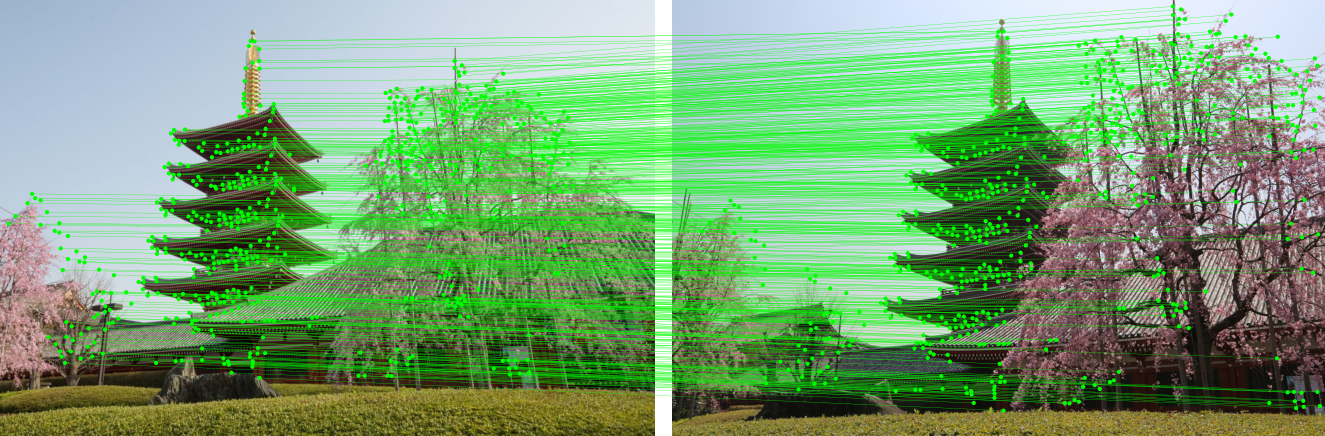
LightGlue (ICCV20231) is a fast feature matcher for image pairs. My previous post covered the ONNX export and ONNX Runtime/TensorRT integration in detail.2 FP8 quantization adds a new set of tradeoffs.
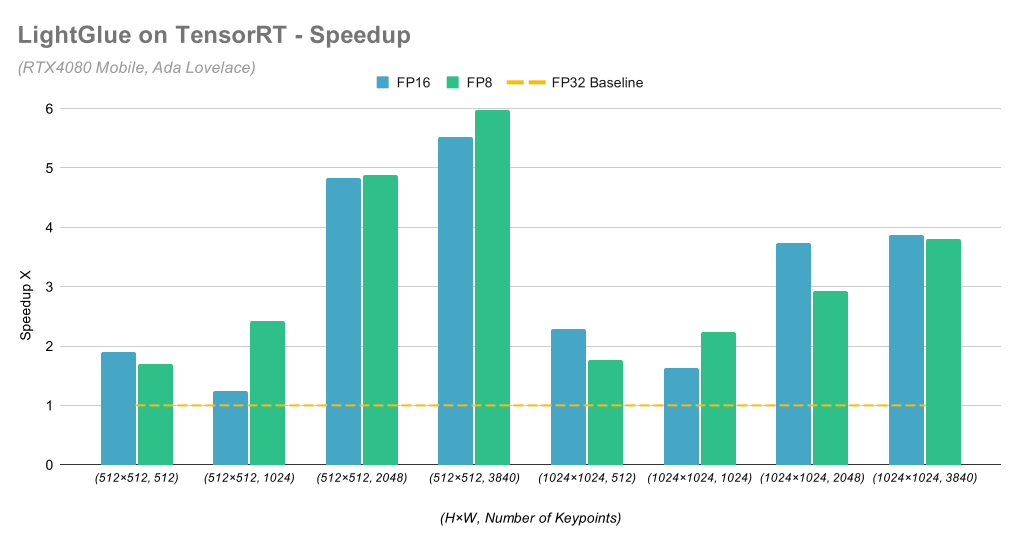
FP8 changes two things that matter in deployment: engine size and math precision. FP8 TensorRT engines for the SuperPoint + LightGlue pipeline came out as small as 0.32× the FP32 size, while reaching up to 5.97× speedup versus FP32. Match counts dropped. Sometimes they dropped hard.
Float8 (FP8)
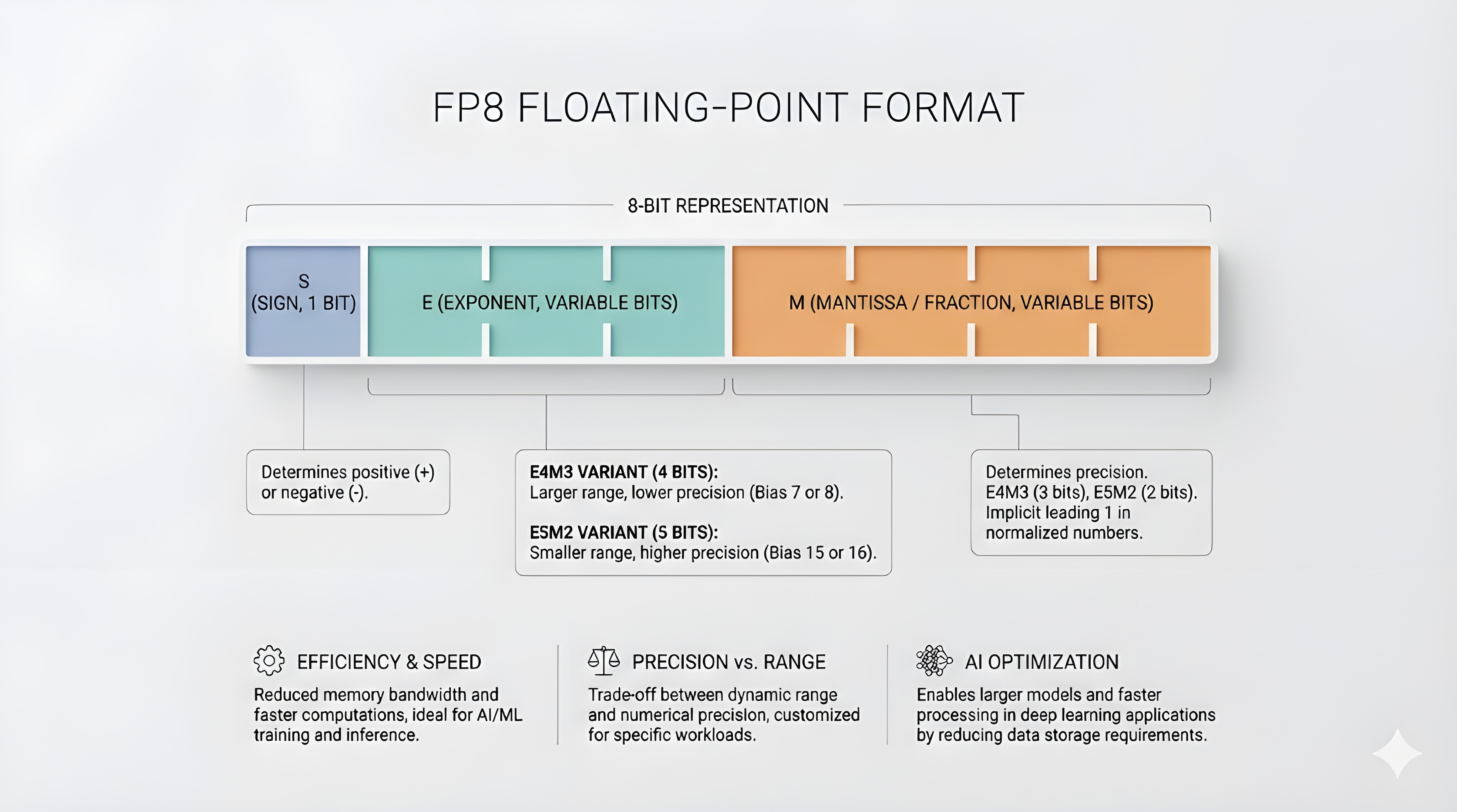
FP8 stores a floating-point number in 8 bits. One bit is sign. The rest are split between exponent and mantissa.
Two formats dominate:
- E4M3: 4 exponent bits, 3 mantissa bits.
- E5M2: 5 exponent bits, 2 mantissa bits.
E4M3 buys mantissa precision at the cost of exponent range. E5M2 does the reverse. The choice matters when activations spike or when accumulation happens in low precision.
FP8 acceleration requires hardware support. NVIDIA GPUs with FP8 Tensor Cores start at Hopper and Ada Lovelace. On earlier architectures, TensorRT may build an engine but FP8 computation is unavailable, so execution must fall back to higher precision.
Quantization Overview
Quantization3 rewrites a model to use a lower-precision representation for selected tensors. Fewer bytes move through memory. Kernels change.
Most deployment quantization is post-training. Calibration inputs drive activation statistics. The quantizer chooses a scale for each quantized tensor, then inserts quantize and dequantize operations at the boundaries.
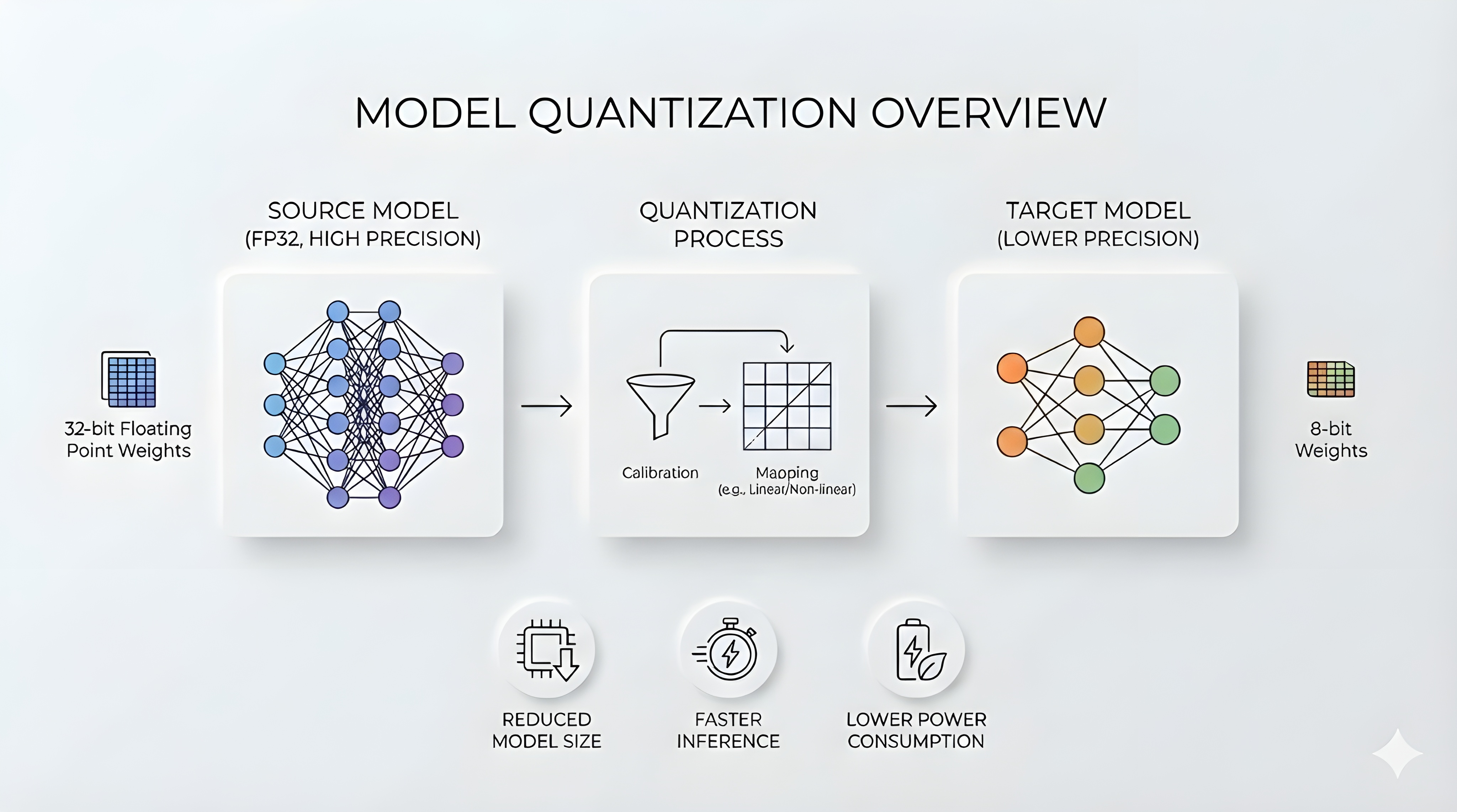
TensorRT’s4 FP8 path here uses explicit quantization. The ONNX graph carries QuantizeLinear and DequantizeLinear nodes and their scales. NVIDIA Model Optimizer5 emits that graph form from a float model.
FP8 seldom covers the full graph. Unsupported operators run in higher precision. Accumulation often does too. The boundary choices decide accuracy drift and whether FP8 wins on latency.
Pipeline Recap
The end-to-end pipeline has two stages:
- SuperPoint extracts keypoints and descriptors from each image.6
- LightGlue matches those descriptors with transformer blocks and produces correspondences.
The pipeline shape has two main knobs: image resolution \((H, W)\) and the number of keypoints \(K\). Resolution shifts work toward SuperPoint’s convolutions, whereas keypoints shifts work toward LightGlue’s transformer layers (attention and matmuls).
Quantizing the ONNX model
The practical flow has three steps. Commands below assume the LightGlue-ONNX repo root as the working directory.
1) Export a static-shape ONNX model
TensorRT benefits from fixed shapes. Export a model that matches the image size and keypoint budget you deploy.
uv run lightglue-onnx export superpoint \
  --output weights/superpoint_lightglue_pipeline.1024x1024.k1024.onnx \
  --batch-size 2 --height 1024 --width 1024 --num-keypoints 1024
2) Quantize to FP8 with NVIDIA Model Optimizer
ModelOpt needs calibration data to set quantization scales. I used two image pairs (one easy, one hard) for a quick pass.
The script below wraps ModelOpt’s ONNX quantizer and takes care of preprocessing:
lightglue_dynamo/scripts/quantize.py.
uv run lightglue_dynamo/scripts/quantize.py \
  --input weights/superpoint_lightglue_pipeline.1024x1024.k1024.onnx \
  --output weights/superpoint_lightglue_pipeline.1024x1024.k1024.fp8.onnx \
  --extractor superpoint --height 1024 --width 1024 \
  --quantize-mode fp8 --dq-only --simplify
What does --dq-only do?
ModelOpt represents explicit quantization in ONNX with Q/DQ nodes. For constant weights, --dq-only stores
the weights in the low-precision format and keeps only the DequantizeLinear nodes that materialize them.
It reduces Q/DQ clutter around constants.
3) Build and benchmark TensorRT engines
The lightglue-onnx trtexec command builds an engine if the input is .onnx, then runs inference and prints match count. With --profile, it also reports median inference time.
uv run lightglue-onnx trtexec weights/superpoint_lightglue_pipeline.1024x1024.k1024.onnx \
  assets/DSC_0410.JPG assets/DSC_0411.JPG superpoint \
  --height 1024 --width 1024 --fp16 --profile
Performance Results
Reproducibility: RTX 4080 Laptop GPU (Ada Lovelace, SM89). Relevant framework versions: nvidia-cuda-runtime-cu12==12.8.90, nvidia-cudnn-cu12==9.10.2.21, tensorrt==10.9.0.34, polygraphy==0.49.26, numpy==2.2.6, opencv-python==4.12.0.88. FP8 quantization via nvidia-modelopt==0.40.0. Latency is the median of 100 runs after 10 warmups.
The sweep covers eight static input configurations:
- Image sizes: 512×512 and 1024×1024
- Keypoints per image: 512, 1024, 2048, 3840
Each configuration has a separate ONNX export and three TensorRT engines (FP32, FP16, FP8). FP8 models use ModelOpt FP8 explicit quantization with --dq-only --simplify. FP8 engines were built with --precision-constraints prefer --fp16.
Why 3840 and not 4096?
SuperPoint selects the top-K keypoints. In TensorRT, that selection maps to the TopK operator, whose maximum supported limit is K=3840.
Speedup versus FP32
FP16 gives strong speedups across the board. FP8 wins even more in a few configurations, then loses in others.
- Best FP32 to FP8 speedup: 5.97× at 512×512 with 3840 keypoints.
- Weakest FP32 to FP8 speedup: 1.76× at 1024×1024 with 512 keypoints.
Engine Size
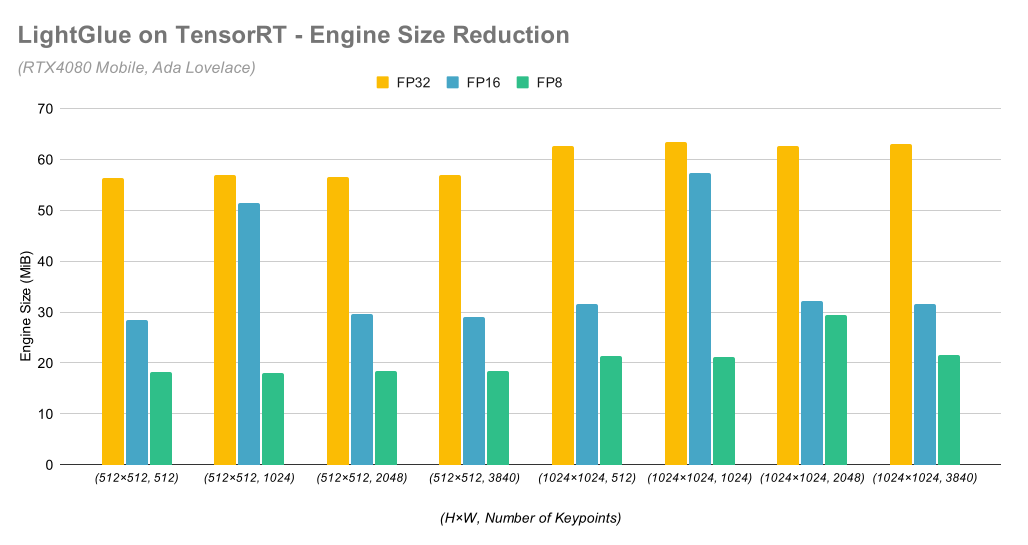
FP8 compresses the engine hard. FP32 engines cluster around 56 to 63 MiB in this sweep. FP8 lands around 18 to 22 MiB, with one outlier at 29.5 MiB.
Match Quality
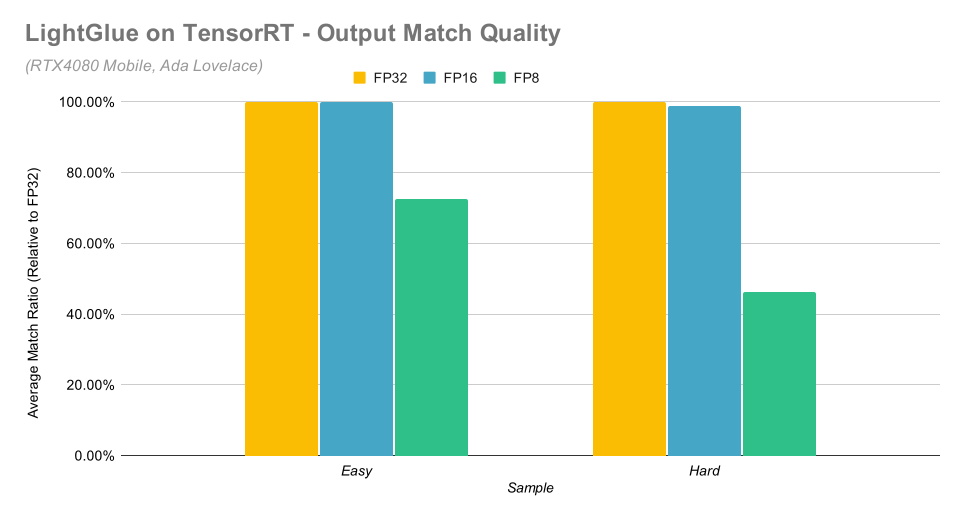
While match count is a crude metric, it is still a useful red flag when a quantization run collapses scores below threshold.
Bars show the mean match-count ratio for two sample pairs across the eight configurations, relative to FP32.
Conclusion
Resolution and keypoint count pull in different directions. 512×512 with large \(K\) pushes work into LightGlue’s attention and matrix multiplications. FP8 can win there. At 1024×1024 with small \(K\), SuperPoint’s convolutional layers dominate. FP16 already runs clean and FP8 pays extra conversion overhead inside the graph.
Engine size follows precision more than it follows shape. FP8 shrinks weights and activations in the serialized engine. The 1024×1024, 2048-keypoint outlier points to tactic selection and layout choices inside TensorRT. That behavior changes across GPUs and TensorRT versions.
Quality is the real constraint. FP8 preserved enough matches on the easy pair for most configurations. The hard pair shows the failure mode - once the assignment scores drift down, the thresholding step removes most correspondences and the pipeline loses its signal. Calibrating on a larger, more representative dataset in the future could help.
References
-
Philipp Lindenberger, Paul-Edouard Sarlin, Marc Pollefeys; “LightGlue: Local Feature Matching at Light Speed” in Proceedings of the IEEE/CVF International Conference on Computer Vision (ICCV), 2023, pp. 17627-17638. ↩
-
Fabio Milentiansen Sim, “Accelerating LightGlue Inference with ONNX Runtime and TensorRT”, 2024. Available: URL ↩
-
ONNX Runtime, “Quantization”, Accessed 2026. Available: URL ↩
-
NVIDIA, “Model Optimizer (ModelOpt)”, Accessed 2026. Available: URL ↩
-
Daniel DeTone, Tomasz Malisiewicz, Andrew Rabinovich; “SuperPoint: Self-Supervised Interest Point Detection and Description” in CVPR Deep Learning for Visual SLAM Workshop, 2018. ↩
-
NVIDIA, “TensorRT Operators Documentation: TopK”, Accessed 2026. Available: URL ↩